](https://niravraval.com/Images/blog_images/2026/May/AZFMCPcoverimage.png)
In my recent project, I integrated the Model Context Protocol (MCP) into an existing Azure Functions API and I wanted to share how it works and why it matters. MCP (Model Context Protocol) provides a standardized interface for connecting Large Language Models (LLMs), such as Microsoft 365 Copilot, to private data and specialized tools. While many implementations focus on local setups, deploying an MCP server in a cloud-native, serverless environment like Azure Functions offers the scalability, security, and flexibility needed for enterprise-grade applications.
The Gateway Pattern
The Gateway Pattern is the optimal architecture for implementing MCP in Azure Functions. Rather than mapping every tool to a distinct function endpoint, a single McpGateway function serves as a protocol adapter. This function exposes all your API endpoints through a unified entry point.
Request Flow
The interaction follows a structured flow where the client sends a JSON-RPC request to the /api/mcp endpoint. The gateway then validates this request, identifies the user context, and parses the specific method requested. Next, the execution engine uses reflection and dependency injection to find and run the necessary tool. Finally, the system packages the result into a JSON-RPC response and sends it back to the client.
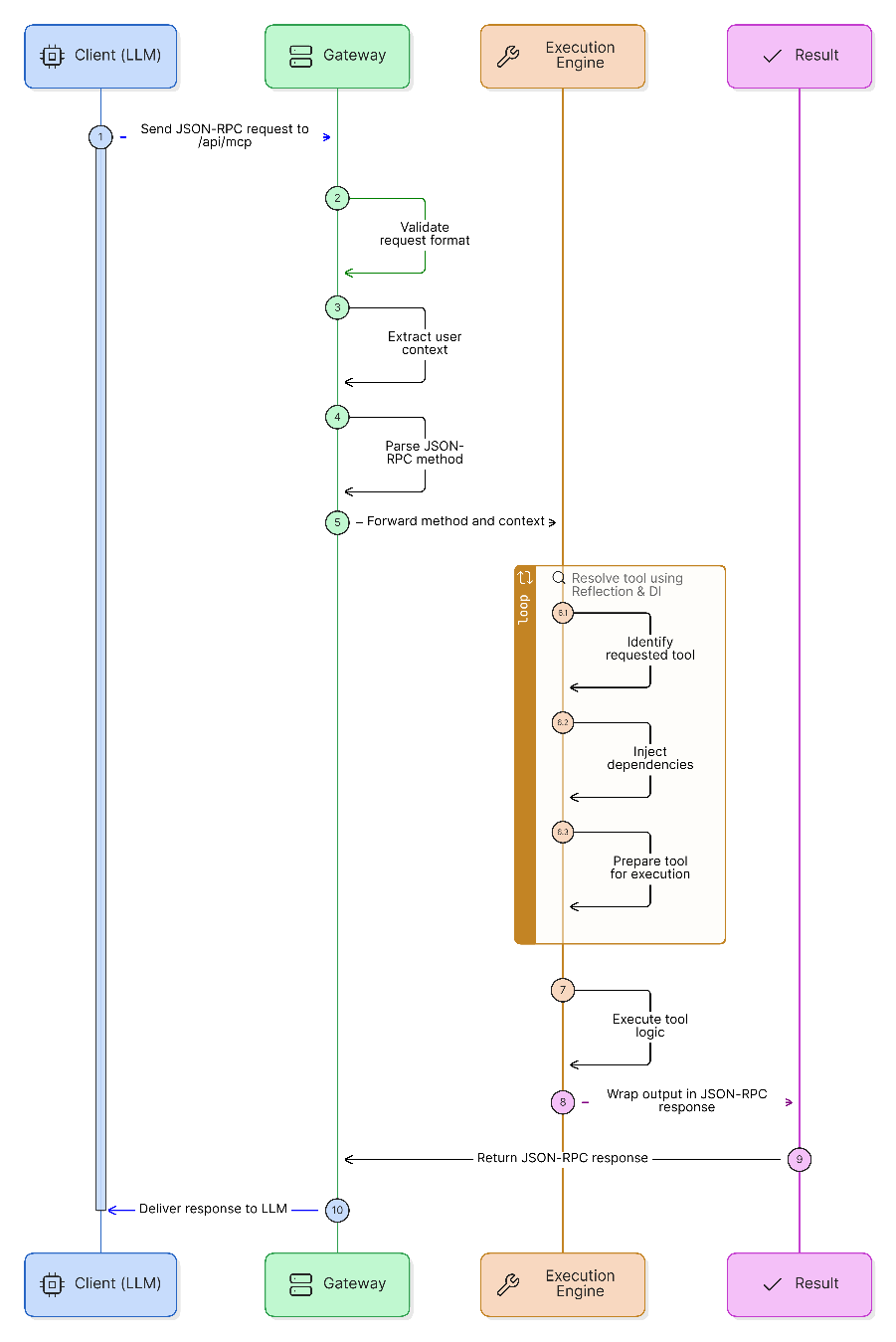
(Generated using eraser.io)
The JSON-RPC Router
MCP operations utilize JSON-RPC 2.0 (a stateless protocol). The gateway must process three core method types: initialize, tools/list, and tools/call.
1. The Initialize Handshake
Before calling any tools, the client “handshakes” with your server to understand its capabilities. This code below defines an Azure Function named McpGateway that acts as an HTTP endpoint for handling JSON-RPC requests. It begins by asynchronously reading the incoming request body and parsing it into a JSON object to extract the method and id fields.
The logic specifically checks if the client is calling the initialize method, which is the standard handshake for the Model Context Protocol (MCP). If it matches, the function returns a successful response containing the protocol version, the server’s capabilities (specifically tool listing), and metadata about the server. This confirms the connection between the client and the server.
[Function("McpGateway")]
public async Task<HttpResponseData> Run([HttpTrigger(AuthorizationLevel.Anonymous, "post")] HttpRequestData req)
{
    var requestBody = await req.ReadAsStringAsync();
    var jsonRequest = JsonConvert.DeserializeObject<JObject>(requestBody);
    var method = jsonRequest["method"]?.ToString();
    var id = jsonRequest["id"];

    if (method == "initialize") {
        return await CreateJsonRpcResponse(req, id, new {
            protocolVersion = "2025-11-25",
            capabilities = new { tools = new { listChanged = true } },
            serverInfo = new { name = "EnterpriseMcpServer", version = "1.0.0" }
        });
    }
}
Example Input:
{
  "jsonrpc": "2.0",
  "id": 1,
  "method": "initialize",
  "params": {
    "protocolVersion": "2025-11-25",
    "capabilities": {}
  }
}
Example Output:
{
  "jsonrpc": "2.0",
  "id": 1,
  "result": {
    "protocolVersion": "2025-11-25",
    "capabilities": { "tools": { "listChanged": true } },
    "serverInfo": { "name": "McpServer", "version": "1.0.0" }
  }
}
2. Dynamic Tool Discovery (tools/list)
Dynamic tool discovery lets your server automatically find and expose available tools without hard-coding them. Instead of maintaining a manual list, you simply mark the methods you want to expose, and the system discovers them at runtime.
You do this using attributes (decorators) to clearly define which classes and methods act as tools:
[AttributeUsage(AttributeTargets.Class)]
public class McpToolProviderAttribute : Attribute { }

[AttributeUsage(AttributeTargets.Method)]
public class McpToolAttribute : Attribute {
    public string Name { get; set; }
    public string Description { get; set; }
}
The server then uses reflection to scan for these attributes and build a tool list dynamically:
var toolList = Assembly.GetExecutingAssembly()
    .GetTypes()
    .Where(t => t.GetCustomAttribute<McpToolProviderAttribute>() != null)
    .SelectMany(t => t.GetMethods())
    .Where(m => m.GetCustomAttribute<McpToolAttribute>() != null)
    .Select(m => new {
        name = m.GetCustomAttribute<McpToolAttribute>().Name,
        description = m.GetCustomAttribute<McpToolAttribute>().Description,
        inputSchema = new {
            type = "object",
            properties = m.GetParameters().ToDictionary(
                p => p.Name,
                p => new { type = GetJsonType(p.ParameterType), description = GetDescription(p) }
            ),
            required = m.GetParameters().Where(p => !p.IsOptional).Select(p => p.Name)
        }
    });
Tool Definition Example:
[McpToolProvider]
public class SharePointTools {
    [McpTool(Name = "search_documents", Description = "Search for files in a document library")]
    public string SearchDocs(string query, int limit = 5) => $"Results for {query}";
}
If you define multiple tools (for example, 5 methods with [McpTool]), the server will automatically return all 5 in the response:
Output to LLM:
{
  "tools": [
    { "name": "search_documents" },
    { "name": "get_document" },
    { "name": "create_document" },
    { "name": "update_document" },
    { "name": "delete_document" }
  ]
}
3. The Execution (tools/call)
The final component is the execution engine. Once the AI knows what tools exist, it needs a way to trigger them. The tools/call method maps incoming JSON arguments to C# types and invokes the corresponding method using Dependency Injection (DI). This allows your tools can access databases, logging, or other enterprise services safely.
private async Task<string> InvokeToolAsync(string toolName, JObject arguments)
{
    // Locate the tool metadata in the registry
    var toolInfo = _toolRegistry[toolName];

    // Resolve the class instance via DI (Dependency Injection)
    var toolInstance = _serviceProvider.GetRequiredService(toolInfo.Type);
    var method = toolInfo.Method;

    // Prepare the arguments for the C# method
    var parameters = method.GetParameters();
    object[] methodArgs = new object[parameters.Length];

    for (int i = 0; i < parameters.Length; i++) {
        var p = parameters[i];
        if (arguments.TryGetValue(p.Name, out var token)) {
            // Convert JSON types to C# types
            methodArgs[i] = token.ToObject(p.ParameterType);
        } else if (p.IsOptional) {
            methodArgs[i] = p.DefaultValue;
        }
    }

    // Execute the logic and handle Async/Sync results
    var result = method.Invoke(toolInstance, methodArgs);
    return result is Task<string> t ? await t : result?.ToString();
}
This execution engine is the bridge between the AI and your application logic. It finds the correct tool, prepares the inputs, runs the method, and returns the result. Everything in a structured way.
Example Input (tools/call): Sends the function name along with the necessary arguments.
{
  "method": "tools/call",
  "params": {
    "name": "Get_record",
    "arguments": {
      "recordId": "REC-99",
      "status": "InProgress"
    }
  }
}
Example Output: The server executes the C# method and wraps the return value into a standardized MCP response format for the AI to process.
{
  "jsonrpc": "2.0",
  "id": "call-456",
  "result": {
    "content": [
      {
        "type": "text",
        "text": "{ recordId: 12, description: \"...\" }"
      }
    ]
  }
}
Best Practices
- Extract JWT tokens from the
Authorizationheader to expose and connect to the server. - Implement all tools as
Task<string>. This aligns with the asynchronous nature of Azure Functions and external Graph API calls.
Conclusion
It can feel time consuming and a bit tedious to set everything up, but once it’s in place, MCP delivers real value. In my opinion, building an MCP server with the gateway pattern isn’t about adding complexity, it’s about creating a clean, secure, and scalable bridge between LLMs and your enterprise systems. With a platform like Azure Functions, this approach improves reliability and security while making it much easier to grow and adapt your capabilities as LLM-powered applications evolve.